

Where Art and Technology Harmoniously Converge

Discover a captivating masterpiece that seamlessly blends the realms of art and technology, transcending boundaries with ArtLum's innovative design. Through the captivating transformation of LED lighting, immerse yourself in an ever-changing display of mesmerizing visual effects, allowing you to experience the allure of art wherever you may be.

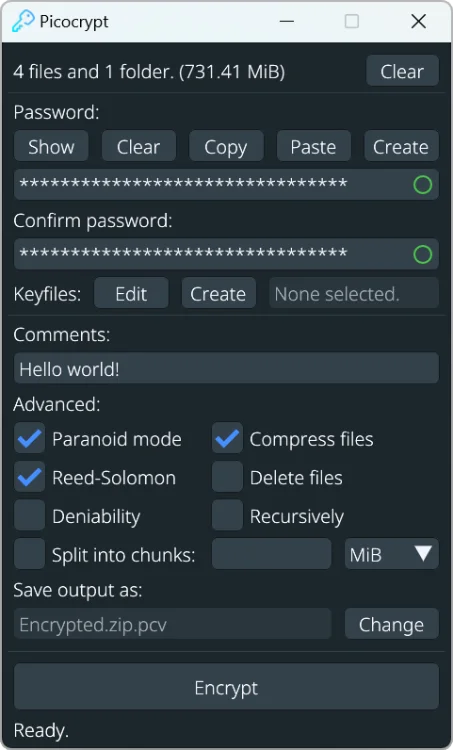
Picocrypt est un logiciel de cryptage simple, sécurisé et gratuit, utilisant le chiffrement XChaCha20 et la fonction de dérivation de clé Argon2id pour protéger vos fichiers. Il se distingue par sa légèreté, sa portabilité et son interface intuitive. Picocrypt offre des fonctions avancées telles que la protection contre la corruption de fichiers, l'utilisation de fichiers-clés…

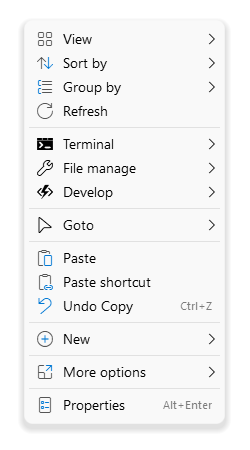
Overview
Shell is a context menu customizer that lets you handpick the items to integrate into Windows File Explorer context menu, create custom commands to access all your favorite web pages, files, and folders, and launch any application directly from the context menu.
It also provides you a convenient solution to modify or remove any context menu item added by the system or third party software.
Shell is a portable utility, so you don’t need to install anything on your PC. All settings are loaded from config file "shell.nss".
Features
Lightweight, portable and relatively easy to use.
Fully customize the appearance.
Adding new custom items such as (sub-menu, menuitem and separator).
Modify or remove items that already exist.
Support all file system objects files, folders, desktop and taskbar.
Support expressions syntax. with built-in functions and predefined variables.
Support colors, glyphs, SVG, embedded icons, and image files such as .ico, .png or .bmp.
Support search and filter.
Support for complex nested menus.
Support multiple columns.
Quickly and easily configure file in plain text.
Minimal resource usage.
Highly responsive
No limitations.
Compatibility
Microsoft Windows 7/8/10/11 (x86/x64/arm64)
La puissance rencontre l'élégance.
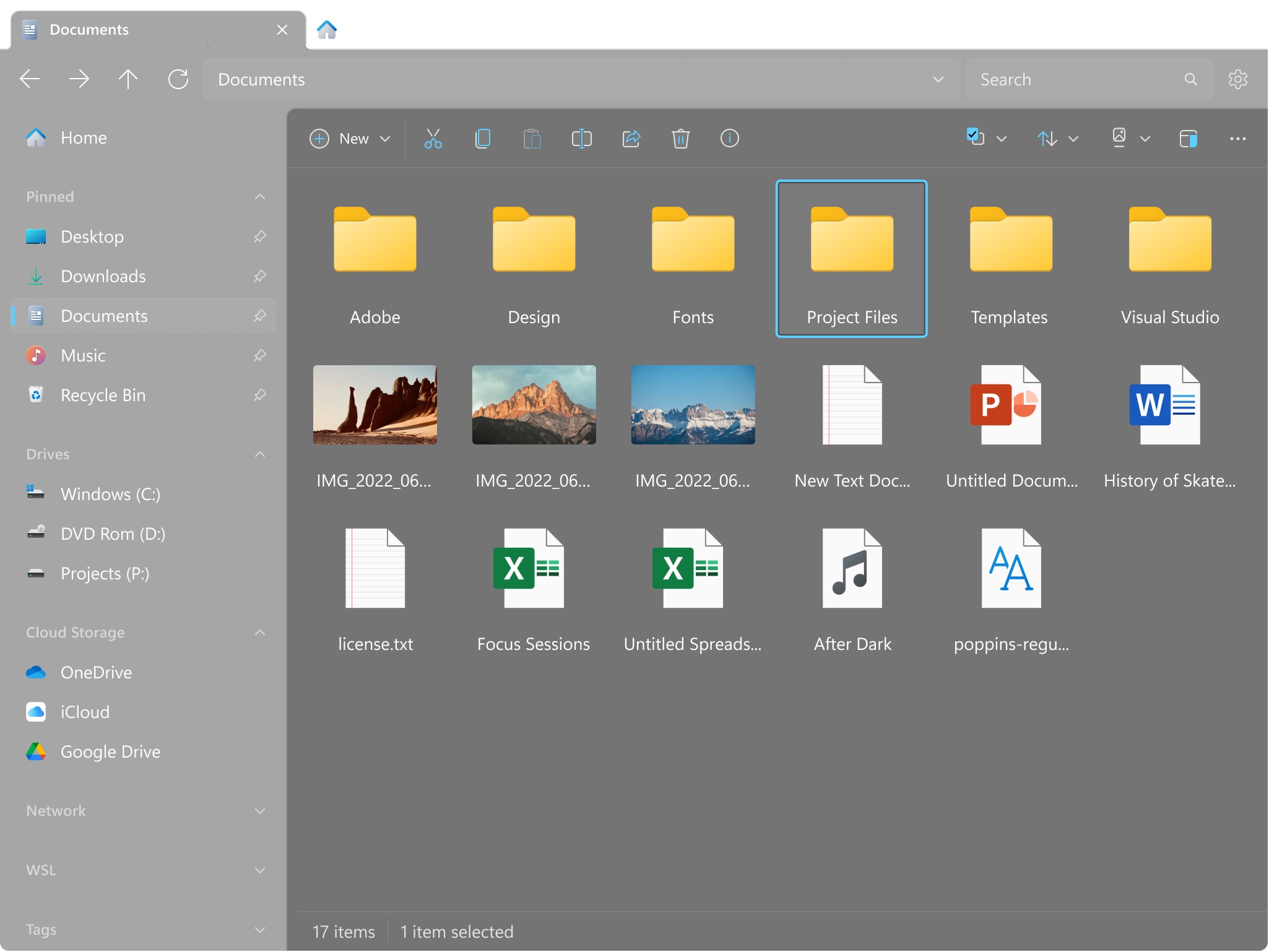
Explorez un design pensé pour Windows. Gérez tous vos fichiers avec une productivité accrue. Travaillez sur plusieurs dossiers simultanément avec des onglets. Et bien plus encore.
Il le fait déjà.
L'intégration du Cloud ? Des onglets et plusieurs dispositions ? Des aperçus de fichiers enrichis ? Files vous offre toutes ces fonctionnalités robustes que vous pouvez attendre d'un gestionnaire de fichiers moderne.
"Roads? Where We're Going? We Don't Need Roads." Back To The Future Part II Released Date: June, 2016 Features: - Officially Licensed by Universal Studios - Delorean Time Machine Back to the Future Part II. - Scale: 1/20 - Length: about 22cm - Levitating Time Machine with Magnetic Floating Base -...
Suivi des colis et des livraisons
Suivez votre colis en provenance de La Poste, Mondial Relay, Relais Colis, Colis Prive, La Poste Chinoise, Royal Mail Royaume-Uni, Aliexpress, Shein, Amazon, eBay, FedEx, Fnac
Suivre les commandes et les colis à partir des magasins en ligne
Peu importe le magasin en ligne ou le marché où vous avez acheté les produits, vous pouvez toujours suivre le chemin complet de votre porte grâce à notre service de suivi des colis.

RSS feed from any website

Aude Vatin Artiste Peintre
Signal-Arnaques est un site communautaire de protection contre les escroqueries d'internet. Près de 378000 arnaques signalées par des internautes francophones y sont actuellement recensées. Pour vous protéger, plusieurs services sont à votre disposition :
Un formulaire de signalement pour mettre en ligne des informations liées à une arnaque dont vous avez été victime ou témoin. Tous les types de fraudes sont acceptés, qu'elles soient liées à des sites internet frauduleux, à des mails, à des réseaux sociaux ou encore à des arnaques téléphoniques...
Un forum d'entraide sur lequel vous pouvez poser une question en cas de doute ou si vous avez besoin d'assistance.
Une base documentaire qui peut vous aider à comprendre le fonctionnement des arnaques et surtout identifier des techniques pour vous en protéger.
Vous ne savez pas par où commencer ? Utilisez le moteur de recherche ci-dessous !
Comment sauvegarder les pilotes de Windows en ligne de commandes (DISM ou PNPUtil)
DISM est une commande bien connue de Windows qui permet de manipuler les images de Windows.
Cette commande permet aussi de sauvegarder vos pilotes pour Windows 8 et Windows 10.
Le principe est assez simple, vous créez un dossier où seront stockées des pilotes et on restaure ces derniers en cas de besoin.
Dans cet exemple, on sauvegarde les pilotes dans le dossier C:\sauvegardes
Appuyez sur le raccourci clavier
+ X ou cliquez avec le bouton droit de la souris sur le menu Démarrer puis sélectionnez “Terminal Windows (admin)“. Plus d’informations : Comment ouvrir Windows Terminal
Puis utilisez la commande suivante :
dism /online /export-driver /destination:"C:\sauvegardes"
Nushell
A new type of shell.
Pipelines to control any OS
Nu works on Linux, macOS, BSD, and Windows. Learn it once, then use it anywhere.
Everything is data
Nu pipelines use structured data so you can safely select, filter, and sort the same way every time. Stop parsing strings and start solving problems.
Powerful plugins
It's easy to extend Nu using a powerful plugin system.
Chat with any PDF
Drop PDF here
Browse my Computer
From URL
Find a PDF
For Students 🎓
Enhance your learning experience with ChatPDF. Comprehend textbooks, handouts, and presentations effortlessly. Don't spend hours flipping through research papers and academic articles.
Support your academic growth and succeed in your studies effectively and responsibly.
For Work 👩💻
Efficiently analyze your documents. From financial and sales reports to project and business proposals, training manuals, and legal contracts, ChatPDF can quickly provide you with the information you need.
Your information is kept confidential in a secure cloud storage and deleted after 7 days for your peace of mind.
For Curious Minds 🤔
Unlock a wealth of knowledge with ChatPDF. Discover new insights and answers from historical documents, poetry, and literature, effortlessly.
ChatPDF can understand any language and reply in your preferred one. Satisfy your curiosity and expand your horizons with the tool that can answer any question from any PDF.

Cross-site scripting (XSS) cheat sheet
This cross-site scripting (XSS) cheat sheet contains many vectors that can help you bypass WAFs and filters. You can select vectors by the event, tag or browser and a proof of concept is included for every vector.
You can download a PDF version of the XSS cheat sheet.
This cheat sheet was brought to by PortSwigger Research. Created by @garethheyes. Follow us on twitter to receive updates.
This cheat sheet is regularly updated in 2023. Last updated: Mon, 27 Feb 2023 11:43:21 +0000.
Open-source tests of web browser privacy.
Updated 2023-02-03